Define semantic check settings only affecting ARIS
Users can start semantic checks in ARIS. The Semantic check is executed and the result is displayed. You can download (
 ) the result.
If errors, warnings, or notes were found, the number of problems found is displayed in the Semantic checks bar.

The affected objects are marked accordingly in the model.
These markers and text messages to be displayed in case of rule violations are defined in Administration client.
Prerequisites
You have the Script administrator function privilege for this tenant.
In the Administration client, click ARIS >
 Administration.
Click
 Navigation in the bar panel if the Navigation bar is not activated yet.
In the navigation tree, click the folder
 Evaluations > Semantic checks > Rule types.
Click the required rule type, for example, Allocation rules. All related rules are displayed.
Select the rule that you want to modify the settings for, such as Function is allocated to organizational unit and click
 Properties. The first page of the properties pages is shown. The page names and the number of pages are related to the rule you have selected. Single property pages are called General, others are called, for example Select object type or Select model type.
On the first property page, click the Finding type field.
Enter a sentence to be displayed if the semantic check was executed in ARIS and this rule was violated. Enter, for example:
An ERROR has occurred: This rule was violated. You must connect this function to an organization unit using one of the allowed connection types, such as 'carries out'.
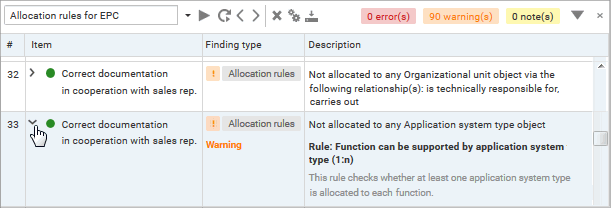
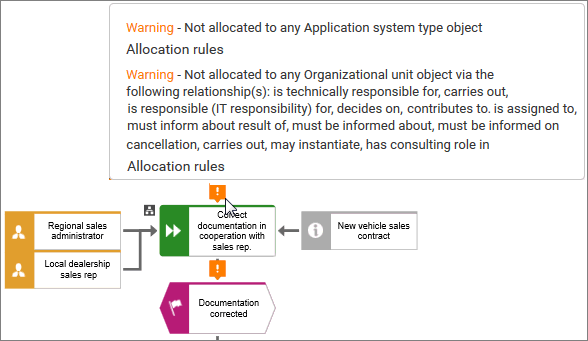
The text is listed in the Finding type column of a semantic check result and in the model if users click the related marker that is to be defined in the Severity field.
Click the Severity field and select a marker, for example,
 Error. The selected value defines whether a rule violation is to be marked as a
  Note, a
  Warning, on an Error. The marker has no impact on the semantic check itself. It only characterizes the severity of the violation to be indicated.
Click OK to save the changes and to close the dialog.
If a semantic check is executed in ARIS and this rule was violated, the Finding type entry and the Error marker are listed in the Semantic checks bar as well as the description that helps you to solve the problem.
In the model, the Error marker is placed above the corresponding object. When you position the mouse pointer over the marker, additional information on the error is displayed, such as the description and the Finding type string that was entered in the rule's properties.
The described settings only affect semantic checks started in ARIS.